So assuming that the easy way ( - the easy way is to use UCMA 3.0, see the ‘Microsoft UCMA 3.0\SDK\Core\Sample Applications\QuickStarts\PublishPresence’ sample in the SDK) is not for you for some reason – such as your implementing your own application using a 3rd party SIP stack on a non-windows platform and you don’t want to build a simple web service that does the heavy lifting for you on a windows box..
To get started you should read the dry but informative protocol spec, [MS-PRES]. And you should also review presence basics (that article is OCS, so doesn’t include the new Lync bits like location and pictures, but it’s a good overview). You will also find the Enhanced Presence Schema download handy – this consists of all the schema mentioned in the protocol specs so you can use a tool to create strongly typed objects in your language of choice as well as a help file (for windows) which is a little more digestible than [MS-PRES].
Showing posts with label UCDev. Show all posts
Showing posts with label UCDev. Show all posts
Friday, November 26, 2010


Wednesday, November 17, 2010
Lync developer resources – UPDATED 12/7/2010
Well, today finally arrived, the day we have all been waiting for. Lync and all its bits are now generally available on MSDN and MS downloads for all to get their hands on.
As the OCS developer site is still lagging a little I thought I would post the list of and a quick summary of the API set:
The API’s
Microsoft Unified Communications Managed API 3.0 Software Development Kit – This is the main deal, if you do any real Lync development you need this. The managed API is a significant improvement on the previous 2.0 release for OCS 2007 R2 with levels of abstraction and simplification for contact list management as well as supporting all the new Lync Server goodies such as conference lobby’s. I cant wait to get busy with this in the coming months.Unified Communications Managed API 3.0 Runtime – Just the runtime to be installed as a pre-req to your UCMA 3.0 application.
Microsoft Lync Server 2010 SDK – For building MSPL scripts and managed sip filters that run inside the Lync server roles (front end or edge usually). Hasn’t changed a lot since OCS or even LCS
Microsoft Lync 2010 SDK [UPDATE – Released 12/1/2010]– The most talked about developer resource that lets you create your own Lync client or just embed bits of it into your own app with a quick drag and drop. Interestingly under the covers its really just a wrapper on the COM API. The COM API is not really documented or available in this version.
Lync Server 2010 Resource Kit Tools [UPDATE – Released 11/18/2010] – Has some useful tools for developers, especially if your doing anything voice related.
Important Development docs
Microsoft Office Protocol Documentation – Its not exactly the most stimulating read but if you need to know what’s going on under the covers, this is the place to go. It has got to qualify as the most technical detail you will find.
Microsoft Lync Server 2010 Protocol Workloads Poster – A neat visio poster of all the call flows for various scenarios.
Unified Communications Enhanced Presence Schemas for Microsoft Lync Server 2010 – Handy if your doing advance presence work.
UC "14" Developer Training Kit [UPDATE – Released 11/18/2010] – If you were not on the TAP and missed the metro training, this is essential viewing for you.
“The Bits” (Full versions are on MSDN subscriber downloads too)
Microsoft Lync Server 2010 Trial (registration required) – The 180 eval, fully functional server you can use to develop against.Microsoft Lync 2010 Trial (32 Bit) / Microsoft Lync 2010 Trial (64 Bit) – The Lync Client itself.
Microsoft Lync 2010 Attendee - User Level Install / Microsoft Lync 2010 Attendee - Admin Level Install – Not to be confused with the Attendant - this is a trimmed down (free I assume, but I’m no licensing expert) version of the Lync client for attending conferences either anonymously or authenticated. Depending on your application, this could offer some interesting options.
Group Chat
Microsoft Lync Server 2010 Group Chat – You will need this if your doing GC development (you know who you are)Microsoft Lync 2010 Group Chat – The GCC, I hope its better than it used to be…
Microsoft Lync Server 2010, Group Chat Admin Tool – Use this to manage rooms and users in GC
Microsoft Lync Server 2010 Group Chat SDK- Here for completeness, you know if you need it. I haven’t even looked at it yet.
Related Stuff
Exchange Web Services Managed API – Not strictly Lync, but so closely related, its here.Outlook 2010: Auxiliary Reference – Also not strictly Lync, but also handy for building client applications.
Wednesday, November 10, 2010
Be Right Back
There are two things about me and presence… –
1.I feel _very_ strongly that it’s a cornerstone of UC (along with User Experience and a single address for a person).
2.I am the worst offender of fake presence. And really I don’t mean to…
The problem is that I want to set my status to away (or BRB) when I get up for a break / lunch whatever, but I am forgetful and I forget to reset it when I get back.
So I built an app that will set me presence to ‘Be Right Back’ when I hit the hot key (shift-caps lock or scroll lock). It then resets my presence when I return (and move the mouse or press any key).
As an aside, I thought it would be a good practice to build this as a real application and go through the now slightly less tedious Windows Platform certification process.
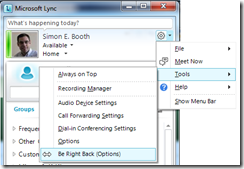
Its setting screen is fully integrated into the Lync UI’s main menu.
And there is not much to this app (yet) :
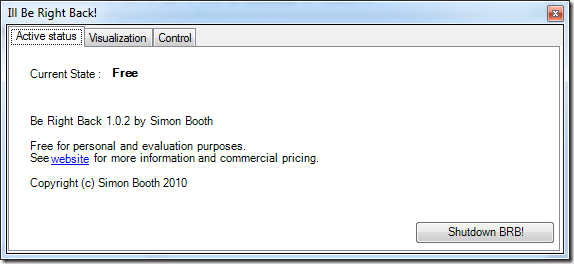
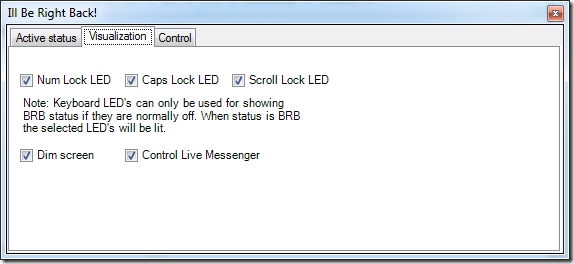

I’m releasing it here free for personal use, if you have a commercial use for it…. please get in touch.
Also if you have any ideas for improvements / feature requests, let me know that too.
I built this simple app using the Lync SDK – I cant wait for Lync to release next week so that I can share some code samples.
Updated 11/15/2010 : Version 1.0.2 now has a couple of bug fixes and better handling of the screen dimmer (not using the power management API as it only seemed to work on laptop screens). I also added Windows Live messenger status sync, for all states including BRB.
1.I feel _very_ strongly that it’s a cornerstone of UC (along with User Experience and a single address for a person).
2.I am the worst offender of fake presence. And really I don’t mean to…
The problem is that I want to set my status to away (or BRB) when I get up for a break / lunch whatever, but I am forgetful and I forget to reset it when I get back.
So I built an app that will set me presence to ‘Be Right Back’ when I hit the hot key (shift-caps lock or scroll lock). It then resets my presence when I return (and move the mouse or press any key).
As an aside, I thought it would be a good practice to build this as a real application and go through the now slightly less tedious Windows Platform certification process.
Its setting screen is fully integrated into the Lync UI’s main menu.

And there is not much to this app (yet) :


I’m releasing it here free for personal use, if you have a commercial use for it…. please get in touch.
Also if you have any ideas for improvements / feature requests, let me know that too.
I built this simple app using the Lync SDK – I cant wait for Lync to release next week so that I can share some code samples.
Updated 11/15/2010 : Version 1.0.2 now has a couple of bug fixes and better handling of the screen dimmer (not using the power management API as it only seemed to work on laptop screens). I also added Windows Live messenger status sync, for all states including BRB.
Friday, October 1, 2010
Outlook social connector development
At the NYMUCUG meeting yesterday a question came up about the documentation for the Outlook social connector (OSC).
Its here on msdn. There is also a sample provider here. More details on John Andersons blog over here.
Lync Contact Pictures (turning them off)
I attended the NYMSUCUG yesterday and few questions came up. One question from an IT manager in a large enterprise asked if the pictures in the contact list in Lync can be switched off.
The answer is of course yes. A user can switch it off (or on) by going into options-> personal –> display photo –> ‘Show photos of contacts’
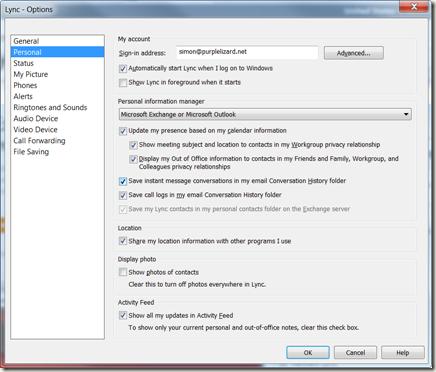
Or if you prefer to use Client Policy look for PhotoUsage and DisplayPhoto in the IT Pro documentation. The documentation is a little confusing as they changed the name of this setting but I believe that the correct parameter is DisplayPhoto, possible values are NoPhoto, PhotosFromADOnly and AllPhotos (OIP docs)
Once off the main UI looks like this:

Subscribe to:
Posts (Atom)